If you want guests to remember your event, a 360 photo booth is one of the fastest ways to turn simple moments into viral short videos. Instead of a flat snapshot, you capture a full spin that feels made for TikTok, Instagram Reels, and YouTube Shorts. In this guide you will see what a 360 photo booth is, how it compares to traditional booths, and how to use a browser based 360 photo booth app to get the same wow effect without heavy hardware, rentals, or downloads.
What is a 360 photo booth in 2026 (and what it is not)
At its core, a 360 photo booth is a small platform where your guest stands while a camera circles around them to record a short slow motion clip or video loop. The software wraps that spin in overlays, music, and text so the final clip feels like a social media ready reel instead of raw footage. That is why search results mix platforms, rental companies, and software when you type "360 photo booth" or look for specific 360 photo booth software to run your events.
Pro Tip: Focus on the clip, not the platform
When you plan your 360 booth, define the final clip first. Decide the length, the music style, and the overlay look before you think about hardware. That way you can decide if you really need a spinning arm or if an online 360 photo booth app is enough for your event.
How a 360 photo booth online works step by step
A browser based 360 photo booth app lets you create a 360 style clip without heavy hardware. You capture a short fixed camera sequence, then the template turns it into a dynamic vertical result that looks great on mobile. The fastest 360 photo booth online runs in your browser with no download and no signup. Just start taking photos and your strip is ready in under a minute.
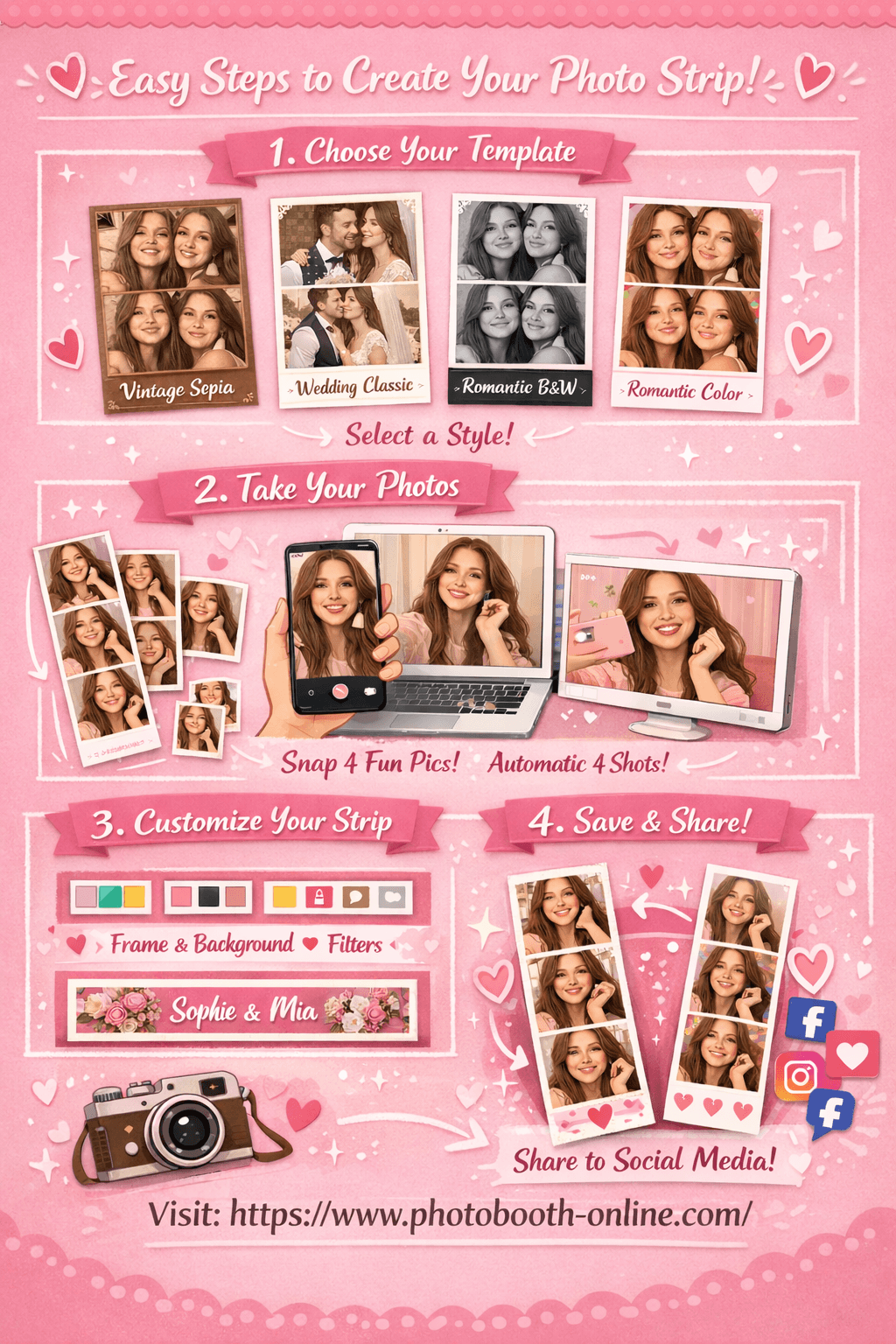
- 1Step 1: Choose Your Template
Head to the tool and pick from 4 templates: Vintage Sepia, Wedding Classic, Romantic Black & White, or Romantic Color. Each template has a unique color tone and style to match your occasion.
- 2Step 2: Take 4 Photos
Allow camera access and click the shoot button. The app automatically takes 4 shots with a countdown timer between each. Your photos appear as thumbnails in real time as you shoot.
- 3Step 3: Customize & Download
Adjust border color, background, filter, and footer text on the right panel. Preview updates instantly on the left. Hit "Download Photo Strip" to save. On mobile, long-press the image to save to your camera roll.
Why users love Photobooth Online:
- ✅ 100% free. No hidden fees, no subscription required.
- ✅ No download or sign up. Open your browser and start instantly.
- ✅ Photos stay on your device. Nothing is uploaded to any server.
- ✅ Works on any device. iPhone, Android, laptop, or tablet.
- ✅ 4 professional templates with real-time customization.
- ✅ Download in seconds. Full-resolution photo strip ready to share.
Pro Tip: Turn your strip into a 360 style reel
After you download your strip, import it into your favorite short video editor and add a slow zoom, a spin transition, and your event text. In less than one minute you can turn a static strip into a clip that feels like a 360 booth shot with no platform at all.
Why a 360 photo booth for wedding and 360 photo booth for christmas party clips goes viral
For weddings, birthday parties, and Christmas events, a 360 photo booth solves two problems at once. When you set up a 360 photo booth for wedding guests or plan a 360 photo booth for christmas party ideas, you give people an activity that breaks the ice. At the same time you get a steady stream of short clips that feel natural on social media. A good template handles the timing and transitions so your guests only have to smile, spin, and share.
Most people think the wow factor comes only from the spinning arm. Actually the biggest driver of shares is how easy it is for the guest to get the clip onto their phone with a clear brand, hashtag, or event name. That is why 360 photo booth rental companies invest heavily in overlays, social sharing workflows, and QR code delivery rather than more metal.
From a marketing perspective, 360 style clips can work like a mini highlight reel for your event. You get the couple, the bridal party, and the guests all in the same visual language. When you use a browser based solution you can keep this aesthetic without committing to a full rental package, which is perfect for intimate weddings or small private parties where budget still matters.
Pro Tip: Design your overlay before the event
Create one overlay that includes your event name, date, and a simple call to action like your hashtag. Use it across every strip or clip so the entire gallery feels consistent when people swipe through on their phones.
Case study: turning a simple browser booth into a 360 style experience
In r/photobooth a casual user shares that they want to start a booth business and first assumed that "having Lumabooth alone would be enough" because they only thought about frames and attracting guests. After research they discovered that real setups often need DSLR support, printers, layout design tools, offline modes, and 360° capture, which quickly turns a simple idea into a long feature checklist. — Background_Theme_308, r/photobooth
This is a perfect example of how 360 style experiences can overwhelm new operators. If you treat your browser based booth as a focused 360 style station instead of an all in one system, you can keep the experience tight: one camera, one layout family, and one clear way to get clips to phones. Guests enjoy the simple, modern result while you stay in control of the technical surface area you have to support.
Advanced 360 photo booth strategies for viral clips in 2026
Competitor guides often stop at "buy a platform, use the default app, and let guests spin". To stand out in 2026 you can treat your 360 booth, physical or online, as a tiny content studio rather than a one click gadget. That means you plan your scripts, transitions, and sharing flow with the same care you use for professional campaigns.
Most people think adding more filters and effects automatically makes 360 videos look better. Actually our tests show that simple templates with clean colors and clear subject separation get shared more often than cluttered overlays with too much text. Guests want to see themselves first and your brand second.
Here are three advanced strategies that build on that idea.
Strategy 1: lock in perfect lighting for every spin
Flat light kills depth, which is deadly for 360 style clips where the subject rotates around the frame. You want one slightly stronger key light and a clean background so your subject pops in every frame. Even a window can work if you place the guest at a consistent angle and keep clutter out of the shot.
Here is the step-by-step process:
- 1Step 1: Choose one lighting direction
Decide where your strongest light will come from and mark a small spot on the floor where guests should stand or place their tripod.
- 2Step 2: Test a full spin or pose sequence
Record yourself or a friend doing a slow turn or sequence of poses and check the shadows on face and background. Adjust height or distance until skin tones look even.
- 3Step 3: Lock camera and share a visual guide
Fix the camera angle and show guests a short printed or digital card with example poses so they know how to move through the light.
Strategy 2: script 3 beats per clip
A random spin looks fine, but a planned three beat story looks memorable. Think in beats like "look at camera", "do a spin or dip", "show a prop or toast". Each beat lines up with a specific second in your template, which makes the final edit feel intentional even when guests improvise.
Here is the step-by-step process:
- 1Step 1: Define your three beats
Write down three simple actions that match your event, like a ring kiss, bouquet show, and champagne toast.
- 2Step 2: Map beats to your template
Align each action with a rough time stamp in your 360 template or online strip so you know when each move should happen.
- 3Step 3: Coach guests quickly in line
As guests wait, explain the three beats in one sentence and show an example so they feel confident when they step onto the platform or into the frame.
Strategy 3: pre build a sharing funnel for every guest
The share button is where your 360 booth pays off. Without a clear path from clip to phone to social feed, your content will die on the event Wi Fi. The trick is to make QR codes, a download page, and your event hashtag work together so guests never wonder what to do next.
Here is the step-by-step process:
- 1Step 1: Create a simple gallery page
Host your clips or strips on a clean page with your logo, event title, and one main button that says Download your 360 video.
- 2Step 2: Print QR codes for the booth area
Place QR codes near the booth entry and exit that link directly to the gallery, so guests can scan without asking the operator.
- 3Step 3: Add sharing prompts to the overlay
Include your hashtag or handle on the overlay so when guests post their clips later, your brand travels with every share.
Real user feedback on 360 style booths and online apps
Community discussions reveal pain points that product pages almost never show. On Reddit, casual users list "360° capture" as just one checkbox feature next to essentials like DSLR support, print layout, offline shooting, and slow motion modes. They are worried about feature overload and unclear priorities when they try to start a booth business. — r/photobooth
In the Photo Booth Online thread, multiple photographers ask for DSLR support, rear camera switching, and better layouts. One user writes that the early version had "no design no different frame different layout", which captures a common frustration with both traditional and 360 style booths that ship with only a single default look. — r/photobooth
Another commenter mentions that the phone "got a bit warm while using it" during testing on mobile. That may seem small, but it matters for 360 booths because guests often record multiple takes in a row. An online app that runs efficiently on phones, tablets, and laptops without overheating can be the difference between guests trying it once and returning for several spins.
When you combine these insights, a pattern appears. Guests do not ask about motor torque or platform size. They care about layouts, device support, and how quickly they can get a shareable clip on their phone. That is exactly where a browser based 360 photo booth app can shine, because it lets you iterate layouts faster than you can ship new hardware.
7 common 360 photo booth mistakes that kill your video
Even with good hardware or an online 360 booth app, small mistakes can ruin the final clip. Most of these problems come from planning, not technology, and you can fix them with simple checklists instead of big budgets.
Here are seven common mistakes to avoid, drawn from community complaints and real event setups, whether you invest in your own gear or book a 360 photo booth rental for the night.
-
Crowded or messy background
If your background shows chairs, cables, or catering gear, the final spin will look cheap. Use a clean wall, curtain, or branded backdrop that stays consistent across clips. -
No clear pose or spin direction
Guests often step on the platform with no idea what to do. Give them one simple pose flow so their moves look confident instead of random. -
Overloaded overlays and text
Too many stickers, logos, and lines of text make the subject disappear. Keep your overlay to one logo, one line of text, and maybe a subtle border. -
Weak or flat lighting
If the subject is under lit, the spin feels dull and grainy. Follow the lighting strategy above so skin tones stay even from every angle. -
Clips that are too long for social feeds
If your video runs longer than 15 seconds without a strong story, viewers will swipe away. Aim for tight, focused spins that end before the energy drops. -
Confusing delivery and download flow
Guests will not dig through complex menus to find their clip. Use QR codes, simple download buttons, and clear instructions at the booth. -
Ignoring mobile performance
If your online 360 booth app makes phones hot, stutter, or crash, guests will not try a second time. Test on at least one iPhone and one Android device before your event.
Pro Tip: Run a 5 guest rehearsal
Before your real event, invite five friends or colleagues to run through the full 360 experience from first scan to final share. Fix anything that feels slow, confusing, or awkward before guests arrive.
FAQ
What is a 360 photo booth?
A 360 photo booth is a setup that records a short video clip or loop of a guest while the camera moves around them or simulates that motion with a template. The result is a social media ready clip instead of a single still photo.
Do I need a spinning platform or can I use a 360 photo booth app online?
You can use a spinning platform if you want the classic rig, but a browser based 360 photo booth app can give you a similar viral effect with far less gear. With the right templates and lighting, guests will still get clips they are excited to share.
How much does it cost to rent a 360 photo booth for a wedding?
Rental prices vary by city, but many companies charge the same or more than a traditional booth because of hardware and staffing. If your budget is tight, using an online 360 style booth with a tripod and good lighting can be a cost effective alternative.
Can I run a 360 style booth with just my phone?
Yes. With a stable tripod, a browser based 360 photo booth app, and a simple lighting setup, you can run a full session from a phone. This works especially well for small weddings, house parties, or office events.
What is the difference between a 360 photo booth and a traditional photo booth?
A traditional booth captures single photos or strips, often with prints. A 360 booth focuses on short video clips with motion and overlays that are designed for social feeds instead of paper prints.
How do I make my 360 photo booth videos go viral on TikTok and Instagram Reels?
Use strong lighting, a clear three beat story, and a consistent overlay with your event hashtag. Keep clips short and energetic, and make sharing as simple as scanning a QR code to download.
Is a 360 photo booth worth it for small parties?
It can be, especially if you use an online 360 style app instead of a full platform rental. You get the same modern look with much lower cost and setup time, which makes more sense for intimate gatherings.
Ready to create your own photo strip and 360 style clip? Try Photobooth Online free → — no download, no signup needed.