When you search for Photo Booth Templates, you mostly see paid PSD packs, subscription template libraries, and Canva layouts that still take time to edit. This guide focuses on photo booth strip template ideas you can actually use today, including quick browser based options and ways to build your own reusable photo booth strips template system without feeling like a full time designer.
What are photo booth templates and why they matter
Photo booth templates are pre-made layouts that define where photos, text, and graphics sit on your final strip or print. A good photo booth strip template handles frame sizes, spacing, and safe areas so you can drop in photos and text without worrying about crops or misaligned boxes. You can reuse the same base template for dozens of events by just changing colors, fonts, and text.
For weddings and parties, templates save you from reinventing the wheel. Instead of manually arranging every photo booth strips template from scratch, you rely on consistent 2x6 or 4x6 designs that print cleanly and feel on brand. This matters even more if you run a booth business and need to turn around custom designs between bookings without burning all your time in Photoshop.
Pro Tip: Keep one master file per size
Create one master file for each size you use most often, such as 2x6 strips and 4x6 prints. Duplicate the master for every event and only change colors, fonts, and text to keep layouts consistent and fast.
10 popular photo booth templates for weddings and parties
Photo strip templates are a popular way to turn photos into classic photobooth-style strips. These vertical layouts usually contain three or four photos stacked together, making them perfect for weddings, parties, birthdays, and events. With the right photo strip template, you can quickly create stylish keepsakes, save the date cards, or social media graphics. Below are some of the most popular photo strip template styles that work beautifully for different occasions.
1. Classic Photo Booth Strip Template
The classic photobooth strip template is the most recognizable style. It usually features four small photos arranged vertically with minimal spacing between them. This template closely mimics traditional photo booth prints and works well for weddings, parties, and event souvenirs.
2. Minimalist Photo Strip Template
A minimalist photo strip template uses simple layouts, clean typography, and neutral colors. The design focuses on the photos themselves without adding too many decorative elements. This style is ideal for modern weddings and elegant announcements.
3. Vintage Film Strip Template
Inspired by old film reels, the vintage film strip template adds retro borders and subtle textures. This design is perfect for couples or event hosts who want a nostalgic look reminiscent of classic photography.
4. Wedding Photo Strip Template
Wedding photo strip templates are designed specifically for romantic announcements and wedding keepsakes. They often include space for the couple's names, wedding date, and small decorative elements such as hearts or floral graphics.
5. Black and White Photo Strip Template
Black and white templates create a timeless and elegant look. They are commonly used for wedding save the date cards and engagement announcements because they give photos a cinematic and emotional feel.
6. Birthday Party Photo Strip Template
Birthday party templates usually feature brighter colors, playful typography, and fun design elements. These templates are great for creating memorable photo booth prints at birthday celebrations.
7. Polaroid Style Photo Strip Template
This template combines the photobooth strip layout with a Polaroid-style frame. Each photo may have a slightly larger border at the bottom for captions, making it perfect for personal messages or dates.
8. Modern Social Media Photo Strip Template
Designed with digital sharing in mind, this template style uses bold fonts and clean layouts that look great on Instagram, TikTok, or other social platforms. It is commonly used for events and brand activations.
9. Bookmark Photo Strip Template
A bookmark-style photo strip template is slightly taller and narrower. Guests can keep it as a small souvenir that fits inside a book, which makes it a popular choice for weddings and themed events.
10. Customizable Photo Strip Template
Customizable templates allow users to adjust colors, fonts, and layouts to match their event theme. These templates work well for people who want complete creative control over their design.
How to use Photobooth Online as a simple photo booth strip template
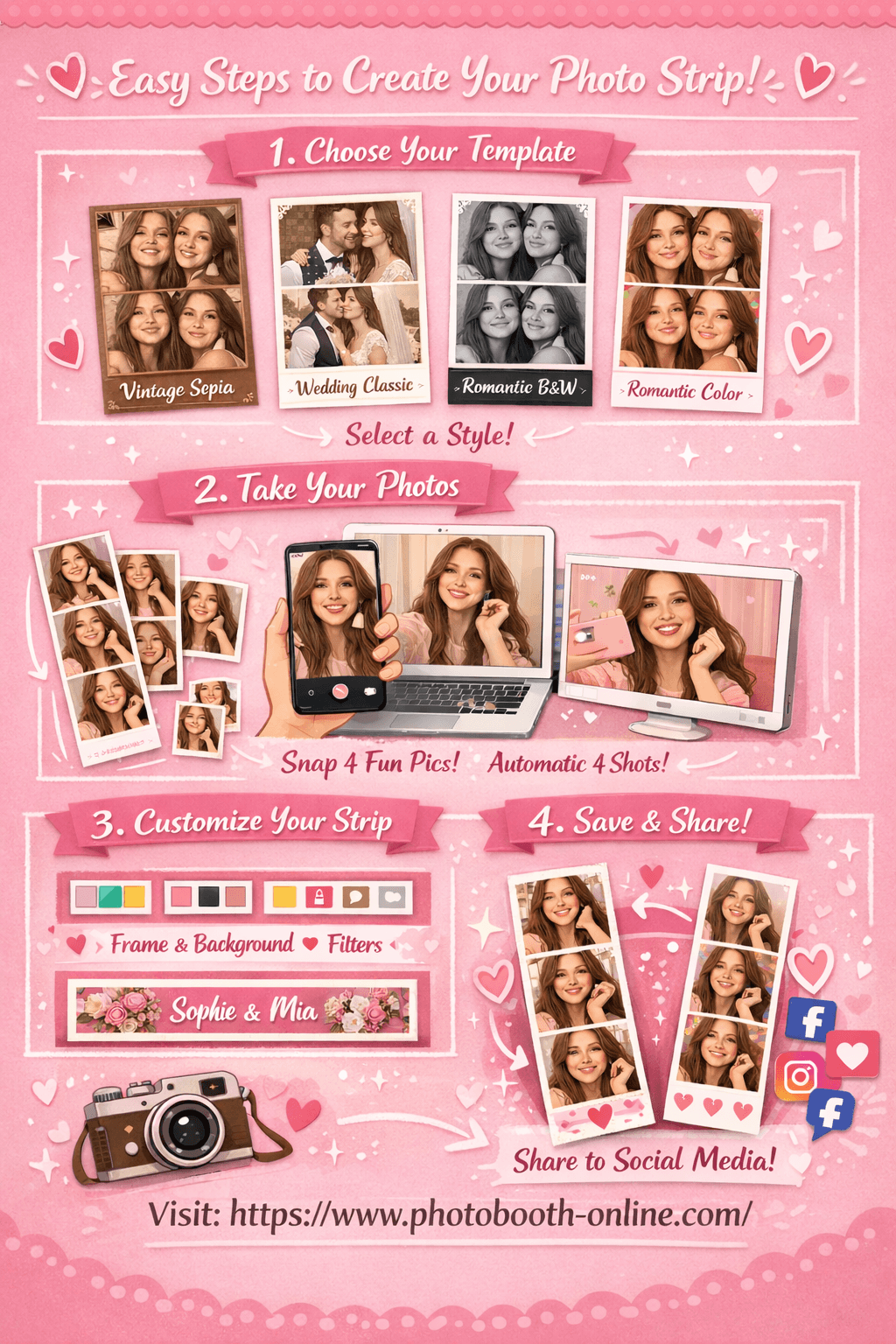
Photobooth Online gives you a ready‑made online photo strip template directly in the browser. You choose from four styles, take four photos, and export a finished strip that already looks like a classic booth design. For small weddings and parties, this behaves like a transparent photo booth strip template you can overlay on your own backgrounds or drop into invitations.
You can treat it as a canva photo strip template alternative when you do not want to push layers around. Instead of building a layout, you use the built in photo booth strip template and focus on poses, lighting, and text.
- 1Step 1: Choose Your Template
Head to the tool and pick from 4 templates: Vintage Sepia, Wedding Classic, Romantic Black & White, or Romantic Color. Each template has a unique color tone and style to match your occasion.
- 2Step 2: Take 4 Photos
Allow camera access and click the shoot button. The app automatically takes 4 shots with a countdown timer between each. Your photos appear as thumbnails in real time as you shoot.
- 3Step 3: Customize & Download
Adjust border color, background, filter, and footer text on the right panel. Preview updates instantly on the left. Hit "Download Photo Strip" to save. On mobile, long-press the image to save to your camera roll.
Why this works as a photo strips template:
- The export is a tall strip you can paste into any 2x6 print canvas.
- Border and background colors are already balanced for faces.
- Footer text lets you show names, dates, or event titles without extra design work.
Pro Tip: Save a blank strip version
Download one strip with no footer text and keep it as a master blank. You can reuse it as a transparent photo booth strip template overlay in other design tools or print layouts.
Photo booth strip template sizes, formats, and safe areas
Before you download or design any photo booth strip template, you need to know the sizes and safe areas your printer and booth software expect.
Common photo booth strip template sizes
2 × 6 inches
Classic strip size for most wedding and party booths. Typically printed two per 4x6 sheet and cut down.
4 × 6 inches
Standard postcard size that fits nearly every lab printer. Often used for layouts that mix strips with larger photos.
5 × 7 inches
Good for premium keepsake prints, guestbook friendly layouts, or when you want more breathing room for branding.
Safe margins and bleed
- Keep important faces and text at least 0.125 inches away from all edges.
- Add bleed (extra image beyond the final cut line) if your lab requires it, usually 0.0625–0.125 inches per side.
- When in doubt, request your printer’s exact template and build your layout on top of it.
Pro Tip: Design for the smallest screen and smallest print
If your layout looks clear on a phone screen and in a 2x6 test print, it will usually hold up everywhere else. Use that as your baseline when you check text size and line thickness.
Tools and resources for photo booth strips template creation
Based on community threads, professionals usually combine a few tools rather than relying on one magic app. Here is a simple stack that covers design, automation, and storage.
Design tools
- Photoshop or Affinity Photo — best for precise control over layers, masks, and export settings.
- Canva — easy for clients or non‑designers to tweak colors and text in a canva photo strip template without breaking the layout.
- Figma — great when you want reusable components and quick variations for different events.
Booth and layout software
- Booth software with layout editor — many apps let you import a transparent photo booth strip template PNG and place photo boxes behind it.
- Online photobooth tools like Photobooth Online — perfect for one‑off events where you do not want to manage full software licenses.
Asset libraries and subscriptions
- Template subscription sites — communities often mention dedicated template libraries that offer hundreds of ready to use 2x6 and 4x6 designs.
- Your own internal library — save every approved client layout as a reusable template so you can adapt it quickly for future bookings.
Pro Tip: Tag templates by event type and color palette
Organize your photo booth templates into folders by event type (wedding, birthday, corporate) and by dominant colors. This makes it much faster to pitch options to clients.
Advanced strategies for managing photo booth templates at scale
If you run a booth business or handle many events per year, the way you organize templates becomes a real performance factor.
Strategy 1: build a minimal base template set
Theory: You do not need hundreds of unique layouts. You need a small set of high quality bases that cover most use cases.
Here is the step-by-step process:
- 1Step 1: Pick your core sizes and orientations
Decide which formats you will officially support, such as 2x6 strips, 4x6 postcards, and 5x7 keepsakes.
- 2Step 2: Design 3–5 base layouts per size
Create a few strong layouts for each size, such as classic, minimalist, bold, and guestbook friendly.
- 3Step 3: Lock structure, vary styling only
Treat frames and safe areas as fixed. For each new event, change only colors, fonts, and text, not the underlying layout.
Strategy 2: systematize client revisions
Theory: Unstructured revision requests chew up time. A simple, consistent process makes template tweaks predictable.
Here is the step-by-step process:
- 1Step 1: Offer 2–3 initial template options
Show clients a small curated set of photo booth templates that match their theme instead of dropping a huge catalog on them.
- 2Step 2: Limit revisions to text and colors
Make it clear that layout changes are rare and may cost extra. This keeps your strip templates intact.
- 3Step 3: Save final versions as new reusable templates
Once a client approves a design, save it into your internal template library with clear tags for future reuse.
Strategy 3: create marketing sets from your best templates
Theory: Your strongest templates can double as marketing assets when you show them consistently across your site and social feeds.
Here is the step-by-step process:
- 1Step 1: Pick 5 hero templates
Choose the strip and postcard layouts that photograph best and match your brand aesthetic.
- 2Step 2: Capture sample photos with diverse groups
Run a short shoot with different couples and friend groups so the samples feel real and inclusive.
- 3Step 3: Use these images everywhere
Feature these template examples on your website, booking pages, and brochures so clients instantly see what they get.
What real operators say about photo booth templates
In r/photobooth threads about the best templates, booth owners say that template subscriptions and reusable layouts save hours of work between events. Many recommend services that provide pre sized 2x6 and 4x6 designs plus overlays for 360 setups, so you do not have to build every photo booth strip template from scratch. — r/photobooth: best templates
Operators also warn against overcomplicating layouts. They note that on 2x6 strips, three photos often look better than four because each frame stays large enough to show faces clearly. Several experienced users recommend creating your own blank master templates so you can keep control of branding and only purchase external templates when you truly need a special look.
"Making a few base templates in Photoshop and reusing them has saved me countless hours. I only buy new ones when I need something really specific." — r/photobooth
These insights all point in the same direction. Whether you rely on a subscription library or build your own photo booth strips template collection, the real win comes from reusability and speed, not endless variety.
Common mistakes when working with photo booth templates
Even good templates can produce weak prints if you use them carelessly. Here are some common issues and how to avoid them.
-
Ignoring printer requirements
Designing purely by eye without checking your lab’s specs can lead to unexpected crops or banding. Always start from a printer provided photo strips template file when possible. -
Using tiny fonts on strips
If guests cannot read the date or event name at arm’s length, your text is too small. Test print one strip and adjust before event day. -
Overloading backgrounds and overlays
Too many graphics or textures compete with faces. Keep backgrounds simple so guests remain the focus. -
Mixing aspect ratios in the same layout
Combining square and rectangular images in one strip can look messy. Stick to one consistent frame ratio unless the design is built for variety. -
Forgetting to localize templates for different events
Reusing a corporate layout for a romantic wedding can feel off. Adjust colors and fonts to match the event tone, even if the frame structure stays the same. -
Not testing on the actual booth hardware
A template that looks perfect on your laptop might behave differently on the booth’s live preview. Run a full test session before the event starts. -
Keeping too many similar templates in rotation
A bloated template library slows you down and makes choices harder. Archive older designs and keep a curated, high performing set.
Pro Tip: Treat templates like a product, not a one-off file
Name, version, and document every photo booth template you keep. When something works well at an event, note why so you can reuse or upsell it later.
FAQ
What are photo booth templates?
They are pre designed layouts that define where photos, text, and graphics appear on a strip or print. You drop in images and wording without rebuilding the structure every time.
Which size is best for photo booth strip templates?
Most booths use 2x6 inch strips printed two per 4x6 sheet. This size balances visibility and print cost.
Can I use Canva for photo booth strip templates?
Yes. Many designers build a canva photo strip template with locked frames and text boxes so you can reuse it across events.
How do I make my own transparent photo booth strip template?
Design the borders and text in a graphics editor, export as a PNG with transparent photo areas, and load it into your booth software as an overlay.
Do I need different templates for weddings and corporate events?
The underlying layout can be the same, but colors, fonts, and graphics should match each event type. Keep a few wedding and corporate variations built from the same bases.
How many templates should I offer clients?
Offering 5–10 curated options per event type is usually enough. Too many choices slow down decisions and increase revision rounds.
Ready to test your own strip layouts? Try Photobooth Online free → — no download, no signup needed.