
Finding the right virtual photo booth software isn't as easy as it sounds. Some tools cost hundreds of dollars, others require bulky equipment, and a few are so complicated you need a tech team just to get started.
We tested the most popular options on the market and narrowed them down to 7 picks, from completely free tools to professional paid solutions, so you can find the right fit for your budget and your needs.
What to Look for in Virtual Photo Booth Software
Not all photo booth software is created equal. Before diving into our picks, here are the five things that actually matter when choosing the right tool.
1) Ease of use
The best software should work without a steep learning curve. Look for tools that run directly in the browser with no downloads or installations required, especially if you are setting up for an event with non-technical guests.
2) Templates and customization
A good tool should offer a variety of templates, filters, stickers, and the ability to add custom text or branding. The more creative control you have, the better your final photo strip will look.
3) Device compatibility
Whether your guests are on a phone, tablet, or desktop, the software should work smoothly across all devices and operating systems, including iOS, Android, and Windows.
4) Pricing
Some tools are completely free, while others charge a monthly or per-event fee. Consider how often you will use it and whether the paid features are worth the cost for your specific needs.
5) Output quality
Look for software that exports high-resolution images in standard formats like PNG or JPG, with easy options to download or share directly to social media.
The 7 Best Virtual Photo Booth Software in 2026
1) photobooth-online.com (best free option, no download needed)
If you want to create a photo booth strip instantly without installing anything, the fastest way is a browser tool like virtual photo booth software. Pick a template, then start taking photos and download your strip in seconds. No account required, and it is free.
Best for
- Individuals
- Casual parties
- Weddings on a budget
Key features
- Runs entirely in the browser (no download, no sign-up)
- Templates, filters, stickers, plus footer text customization
- Works on iPhone, Android, and desktop
- Instant download you can share anywhere
Pricing: Free
Pros
- Completely free
- Instant setup
- Works on any device
Cons
- Designed for personal use rather than large-scale event deployments
Pro Tip:
If your guests are not technical, a browser-based tool is usually the lowest-friction option. No installs means fewer drop-offs at the start of the line.
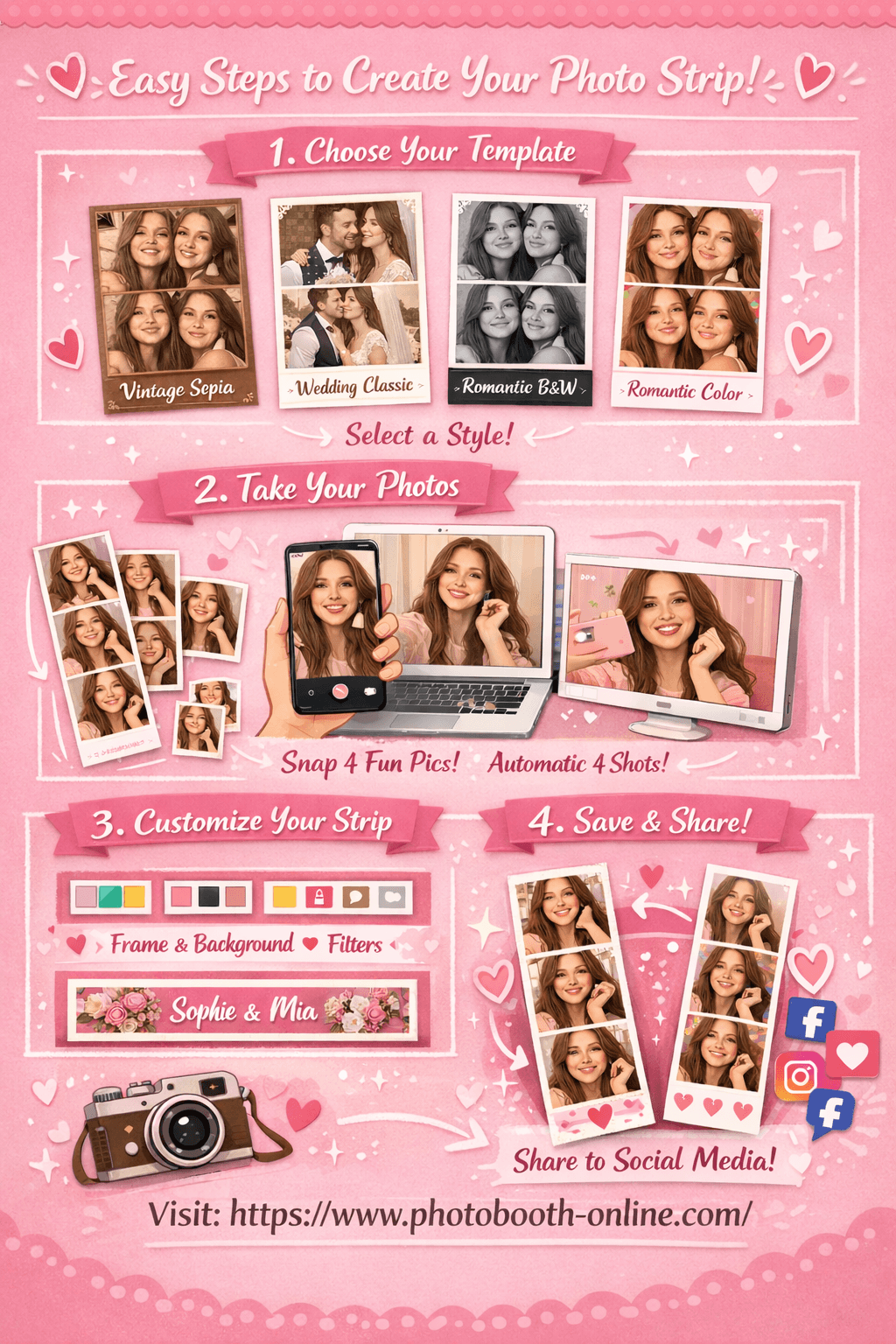
How to create a photo strip with Photobooth Online (3 steps)
- 1Step 1: Choose Your Template
Open the tool and pick from 4 templates: Vintage Sepia, Wedding Classic, Romantic Black & White, or Romantic Color. Each template has a different vibe, so choose the one that matches your event.
- 2Step 2: Take 4 Photos
Allow camera access and tap the shoot button. The app captures 4 shots with a countdown between each one. Your thumbnails update as you go, so you can quickly decide if you want to retake.
- 3Step 3: Customize & Download
Customize your strip (background color and pattern, filters, stickers, and footer text). Preview updates instantly. Then hit download to save a full-resolution strip.
Why users love Photobooth Online:
- ✅ 100% free. No hidden fees, no subscription required.
- ✅ No download or sign up. Open your browser and start instantly.
- ✅ Photos stay on your device. Nothing is uploaded to any server.
- ✅ Works on any device. iPhone, Android, laptop, or tablet.
- ✅ 4 professional templates with real-time customization.
- ✅ Download in seconds. Full-resolution photo strip ready to share.
2) Snappic (best for professional event operators)
Snappic is built for professional photo booth operators who need advanced features, effects, and reliable support for high-end events.
Best for
- Event operators
- Corporate activations
- Luxury weddings
Key features
- Advanced effects and sharing options (email, SMS, social)
- Works with iPad/iPhone and can integrate with pro camera setups
- Support and operator-focused workflows
Pricing: Paid plans (varies by package)
Pros
- Feature-rich for professional work
- Strong support
Cons
- Costs add up for small events
- Heavier setup than browser-only tools
3) Darkroom Booth (best one-time purchase for Windows)
Darkroom Booth is a Windows-focused option sold as a perpetual license. It is a solid fit if you want to own the software outright and run a more traditional booth setup.
Best for
- Professional photographers
- Wedding operators on Windows
Key features
- Built-in print templates
- Green screen, GIF, and video options
- Remote control features
Pricing: One-time license, with optional paid updates
Pros
- Own it outright (no monthly subscription required)
- Reliable for long-running setups
Cons
- Windows-only
- Not ideal if you need iPad-first workflows
4) dslrBooth (best for DSLR camera workflows)
dslrBooth is for photographers who want control over a DSLR setup. It supports a wide range of cameras and runs on Windows and macOS.
Best for
- DIY enthusiasts with a DSLR
- Photographers who want deep camera control
Key features
- Broad camera support
- Multiple capture modes (photo, GIF, video)
- Layout editor for print-style outputs
Pricing: Paid plans (varies by license)
Pros
- Maximum camera flexibility
- Strong customization
Cons
- More setup and learning curve than iPad-only apps
5) Simple Booth HALO (best for brand activations and lead capture)
Simple Booth HALO is known for marketing workflows such as lead capture and branded sharing, alongside a polished booth experience.
Best for
- Corporate events
- Brand activations
- Venue installations
Key features
- Branded overlays and layouts
- Sharing plus data capture flows
- Offline-friendly workflows
Pricing: Paid plans (weekly or monthly options)
Pros
- Easy for non-technical operators
- Strong marketing features
Cons
- Higher tiers can get expensive
- Often iPad-centric
6) LumaBooth (best budget option for iPad and Mac)
LumaBooth is a budget-friendly Apple ecosystem choice that supports popular booth modes and a portable setup.
Best for
- Small business owners
- Freelance event planners on Apple devices
Key features
- Works on iPad and Mac
- Popular booth modes (stills, GIFs, short video loops)
- Customization tools for overlays and sharing
Pricing: Paid subscription (typically monthly)
Pros
- Good value for Apple-based operators
- Solid feature set for the price
Cons
- Apple devices only
- Not ideal if you need Windows-based hardware
7) Pixilated (best for corporate and large-scale events)
Pixilated is positioned for enterprise-style events where brand consistency and analytics matter, with browser-based access for guests.
Best for
- Corporate marketing teams
- Large conferences
- Multi-location campaigns
Key features
- Browser-based guest experience
- Branding and galleries
- Analytics and remote management
Pricing: Custom pricing
Pros
- Low friction for guests
- Enterprise-ready features
Cons
- Typically higher cost
- Overkill for personal use
Free vs Paid Virtual Photo Booth Software: Which Should You Choose?
The honest answer is that it depends entirely on how you plan to use it.
Choose a free tool if:
- You are creating photo strips for personal use, a small birthday party, or a casual get-together.
- You are on a tight budget and do not need professional-grade output.
- You want something that works instantly without setup, contracts, or monthly fees.
- You do not need on-site printing or custom brand overlays.
Choose a paid tool if:
- You are running a professional photo booth business or managing commercial events.
- Your client expects branded outputs with custom logos, colors, and print layouts.
- You need on-site printing, offline mode, or DSLR camera support.
- You are handling large-scale corporate activations where data capture and analytics matter.
The gap between free and paid tools has narrowed significantly in recent years. Free browser-based tools now offer filters, templates, stickers, and instant sharing that used to require expensive software. For most personal users and small event hosts, the free options on this list will do everything you need.
If you just want to make a great-looking photo strip right now without spending a dollar, Photobooth-online.com is the fastest way to get started. Open it in your browser, pick a template, and you are ready to shoot.
FAQ about Photo Booth Software
What is virtual photo booth software?
Virtual photo booth software lets you create photo booth experiences directly from a computer, tablet, or smartphone without needing a physical booth setup. You can take photos, apply filters and templates, and download or share your finished photo strip in minutes. Some tools run in a browser with no installation required, while others are dedicated apps designed for professional event operators.
Can I use photo booth software without a physical booth?
Yes. Most modern photo booth software works with any camera, including the built-in camera on your laptop, tablet, or smartphone. You do not need a dedicated photo booth enclosure, a DSLR, or any special hardware to get started. Tools like Photobooth-online.com run entirely in your browser and work with whatever device you already own.
What is the best free photo booth software?
Photobooth-online.com is the strongest free option available today. It requires no download, no account, and no payment. You get access to multiple templates, filters, stickers, and instant download, all at no cost. For personal use and small events, it covers everything you need.
Does virtual photo booth software work on mobile?
Yes, most tools on this list work on mobile devices. Browser-based options like Photobooth-online.com and Pixilated work on any smartphone through Safari or Chrome. iPad-specific tools like Simple Booth HALO and LumaBooth are optimized for tablet use. If mobile compatibility is a priority, check that the tool you choose does not require a desktop app before committing.
How much does photo booth software cost?
Pricing varies widely depending on the tool and how you plan to use it. Free browser-based tools cost nothing. Entry-level paid software starts at around $9 per week or $20 per month. Professional platforms with full event management features typically range from $60 to $300 per month, or charge a one-time license fee of $100 to $300. If you are just starting out, we recommend trying a free tool first before investing in a paid plan.